

A few months on from Architizer’s coverage of Henning Larsen’s collaboration with AI platform Krea, with the tools now woven into daily practice, here is what Practitioners Nitsan Bartov (Architect and Researcher) and Eliana Nigro (Head of Digital Adoption), have to share about how it is actually used in practice.
When we launched our enterprise partnership with Krea, we expected the conversation to be about automation and speed. Instead, the thread that kept surfacing was something more fundamental: communication.
The image has stopped being a thing we produce at the end of a process and is becoming an instrument we use inside it — a way to make an idea visible early enough for others to shape it, to clarify intent and surface disagreement before it becomes expensive.
Why Krea: We Let the Studio Choose
Krea was never a top-down decision. Before approaching Krea directly, we gave people across the studio a safe sandbox to test the AI tools already on the market, then gathered their feedback. The response to Krea was unusually consistent across geographies, disciplines and levels of technical confidence: people found it accessible, balanced and genuinely useful. That groundswell is what prompted us to approach Krea — the studio chose it, and we followed.
We want to be honest about it, limits included. As one of my colleagues put it: “AI can produce a beautiful image of a building that could never actually stand up.” The interesting question was never whether the software is impressive, but whether a studio can build the judgment, the workflows and the shared literacy to use it well.
From Model to Image
A great deal of our daily work is image-to-image. We take a model from Rhino or Revit — geometry we already trust — and turn it into something that communicates the experience the model alone cannot. A 3D view or a technical drawing tells you where the walls are and how the materials connect on a technical level.
It rarely tells you what it would feel like to stand there at dusk, or what story a space is trying to tell. We use Krea to bridge that gap, translating accurate geometry into an image that carries atmosphere and intent.
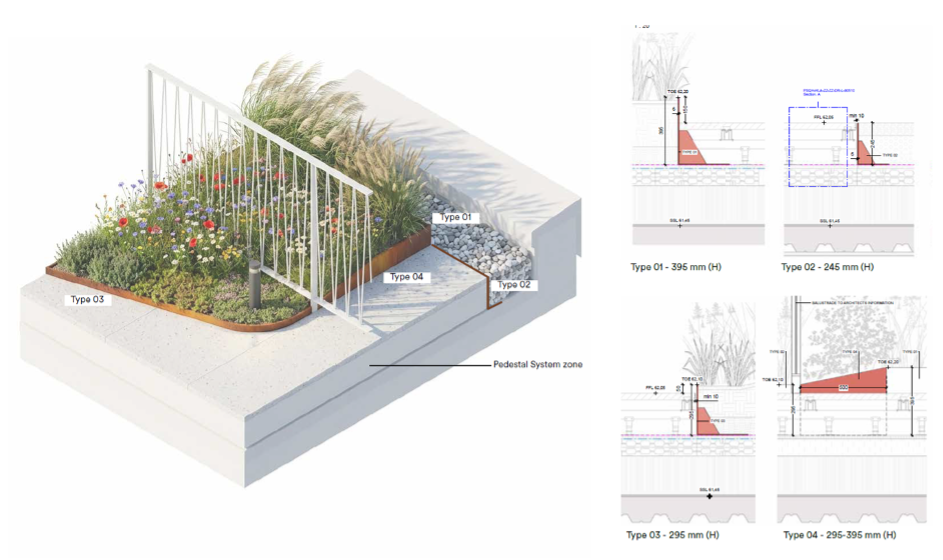
Brian Malig Collado, Landscape Architect, turns a Revit model into an engaging visual representation of a detail using Krea, carrying the atmosphere and experience the model alone cannot convey.
Architects are conditioned to chase the single “money shot” — one image that has to capture everything, because traditionally each rendering is expensive and slow. We still need those hero images, but alongside them, we can now generate small, focused vignettes: a particular moment, a threshold, a corner of a project, produced quickly and clearly.
Interestingly, narrowing the frame is also how we sidestep a lot of AI’s tendency toward generic “slop.” A tightly scoped image of one specific moment is far easier to get right than a sweeping view trying to do everything at once.
It also lets us show things that aren’t strictly part of our scope. In one residential project, we wanted to convey what it would be like to look out from inside an apartment — a view we don’t design and would never model, since the interior isn’t ours. With a quick Google Earth capture from the building’s actual location, we could generate a genuinely compelling image of that outward view.
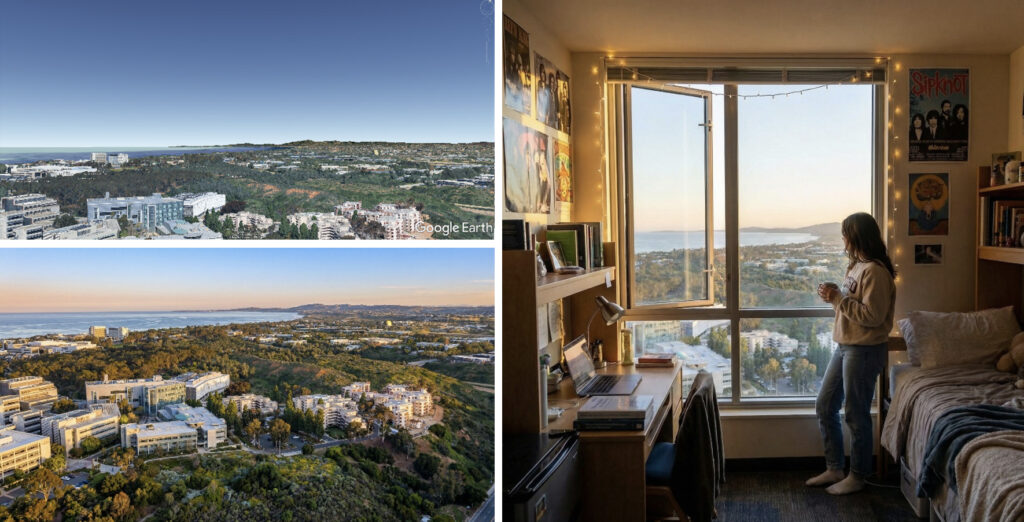
Associate Design Director Andreas Brunvoll’s view from the 29th floor looking north, generated using Krea from nothing more than a Google Earth image and the shape of the window.
Generating What Isn’t There
Where image-to-image starts from our geometry, text-to-image lets us produce things it would make no sense to model at all — diagrams, conceptual snippets, tight close-ups of an idea. When there is no point building it in 3D, we describe it instead.
We’ve also started using the more analytical “wisdom” of large language models as a brainstorming partner for representation itself — not to make the picture, but to think through different ways a concept could be communicated or graphically structured before we commit to one. It’s a small habit that has made our diagrams sharper.
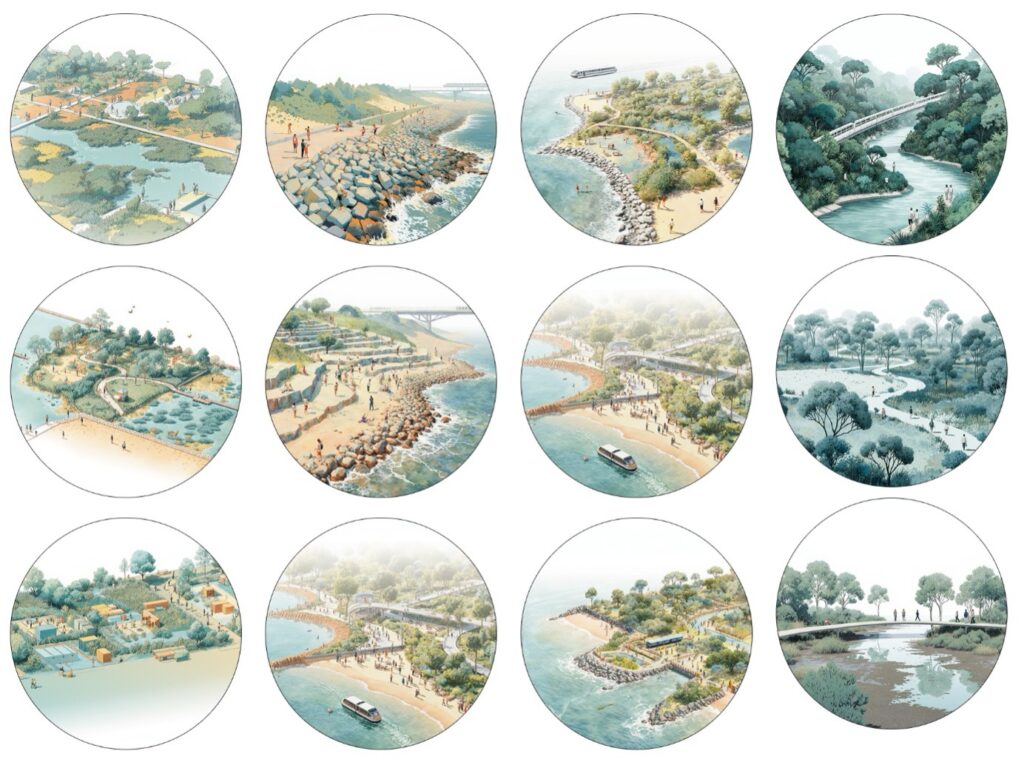
Associate Landscape Architect Madeline Leong’s created a workflow in Krea for generating consistent diagrams of landscape elements.
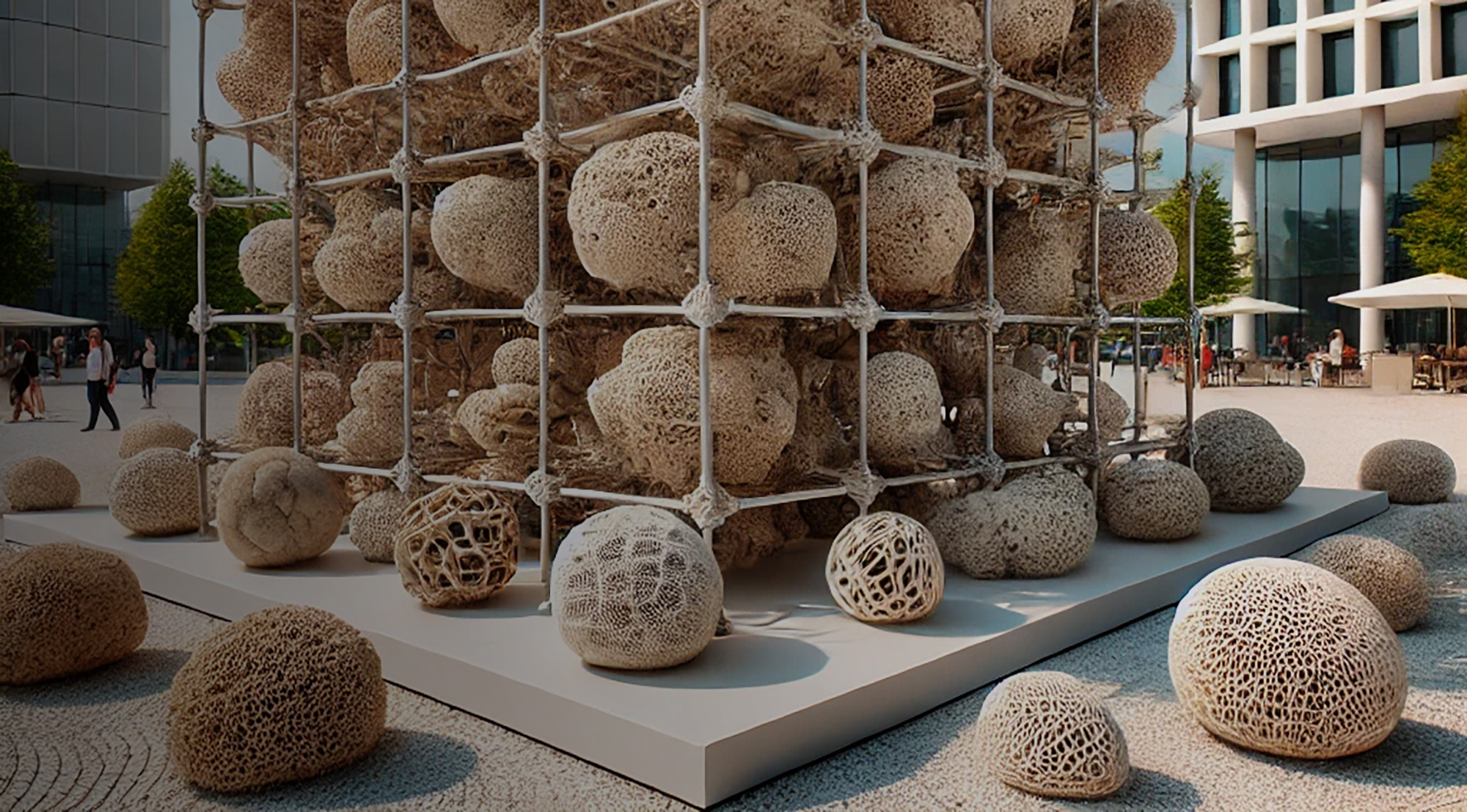
The most striking version of this is when there is no precedent to lean on. For Milan Design Week, we developed a concept for a pavilion built from mycelium spheres. The idea was clear but novel and there were no reference images to point to. The Rhino model did little to convey the lived experience of being among those forms.
Using Krea the team generated visuals that helped communicate the scale, rhythm and composition. What was eventually built ended up remarkably close to those early AI explorations.
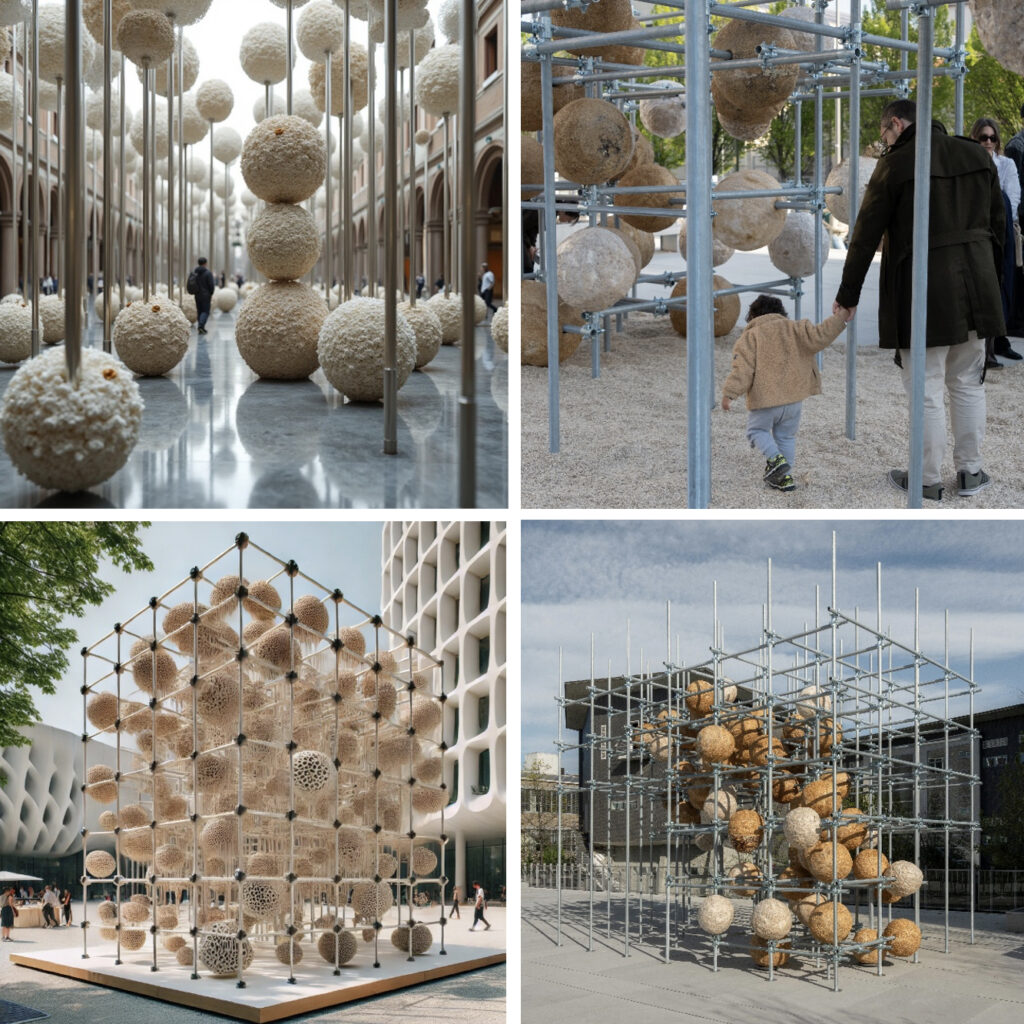
Project Manager and Architect Nicole Vettore’s mycelium pavilion for Milan Design Week. Left: AI conceptual visualizations; right: the final built pavilion; top photo by Zoey Kroening; bottom photo by Piercarlo Quecchia DSL Studio.
A Visual Language of Our Own
One of the deeper shifts has been in the range of ways we can communicate an idea. Modes of expression that used to sit outside most people’s reach — video, particular artistic styles, distinct rendering languages — are now part of the everyday vocabulary of the studio.
This is not about doing away with expertise; it is about widening the vocabulary available to everyone, so we can reach for the most fitting way to communicate a given aspect of a project rather than defaulting to whatever we already happened to know how to make. For the studio as a whole, that is a real expansion of expressive range — new ways to say what we mean.
Consistency, though, is where things get genuinely interesting for a practice like ours. We create our own styles and train our own LoRAs, and we do so on a strict principle: we do not train on or reference other people’s work. To protect against plagiarism and intellectual property infringement, our models are built only from material we curate and own.
That curated work is highly valued, and we continue to use it for our most refined, high-end imagery. But when a project demands visual consistency across many images, we can produce a tightly controlled style reference of our own and train a LoRA that reliably reproduces it.
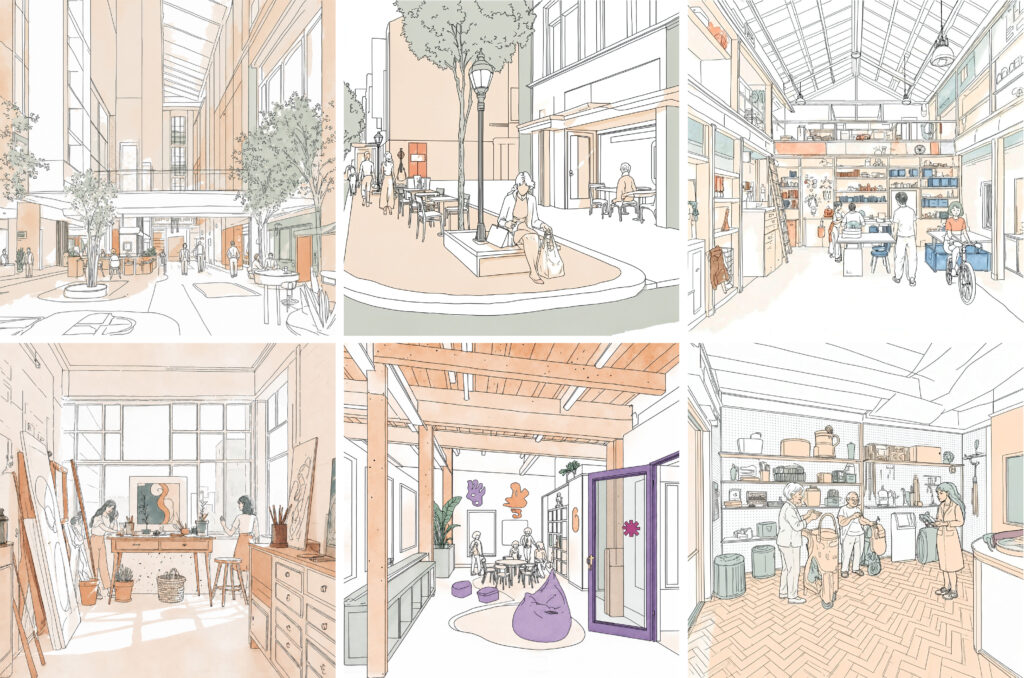
A self-curated image style was curated by Architects Alice Megan Miller and Fenton Lau using Krea, and used to display different moments from the project.
The same capability powers our storytelling. For presentations and talks, we can generate consistent iconography and visual motifs that are not only engaging but fast, consistent enough to survive last-minute changes and accessible enough to bypass the skill gaps that used to make this kind of polish a luxury. The look holds together even when the content shifts an hour before the talk.
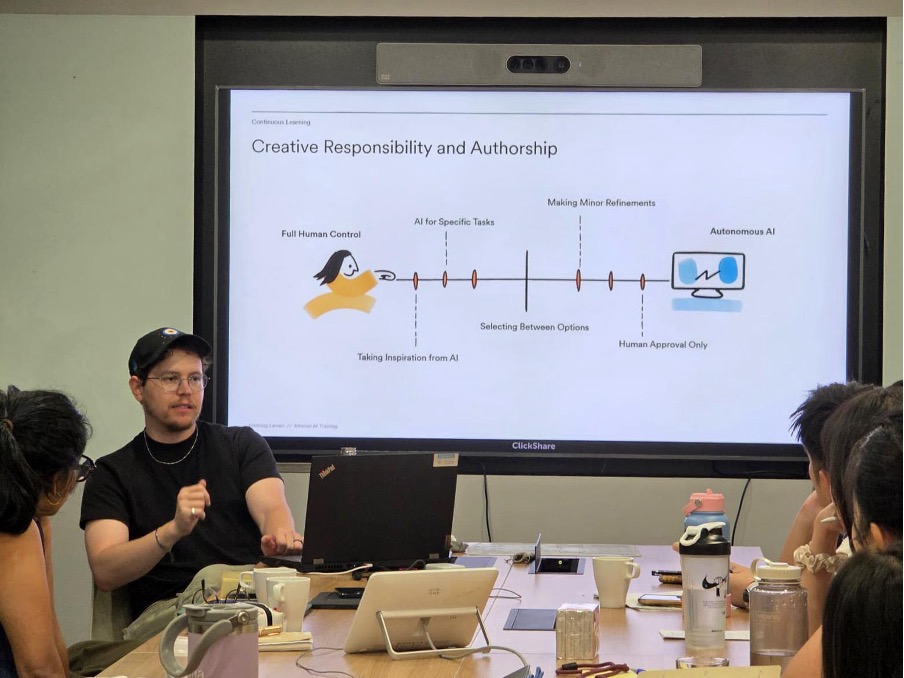
Nitsan Bartov explaining the spectrum of AI involvement in relation to Creative Responsibility and Authorship, with one of his Krea-made pictograms on the screen behind him.
In the Room with the Client
Architecture has always carried a distinct challenge: a client describes something in words, and somehow both sides have to arrive at the same picture of what those words mean. Historically we closed that gap with weeks of modeling — building options simply to find out what someone meant. With Krea, we can often visualize an idea during the conversation itself.
When a client asked what an art gallery tucked into a parking level might look like, or wanted a specific quality of shading on an urban project, we could explore the implications then and there, together. On several projects, that has saved months of work that would otherwise have gone into modeling options just to interpret a sentence.
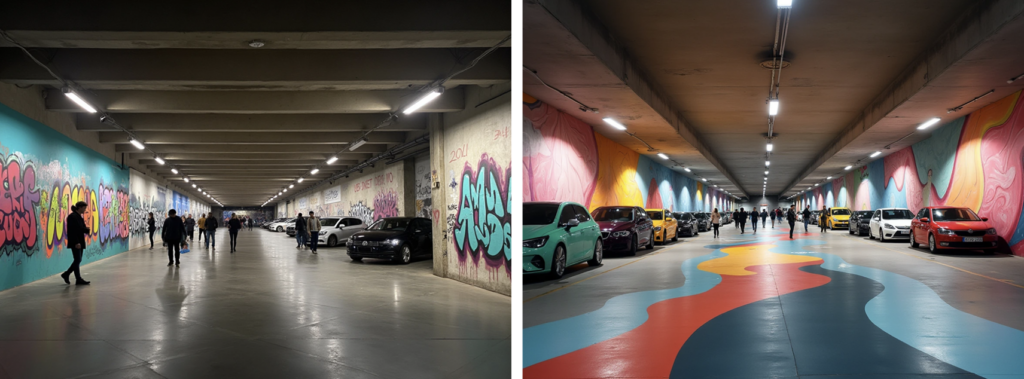
Lead Design Architect Franck Fdida used Krea to visualize and explore in real time what a client’s request for a street-art gallery in the parking lot could actually mean. The client denied the first option, and loved the second one.
It also lets us make technical detail legible to people who don’t read drawings. On one project a client wanted to understand how a green façade would sit against a particular cladding detail. Without modeling, we were able to explain how a green façade would sit against differing types of cladding.
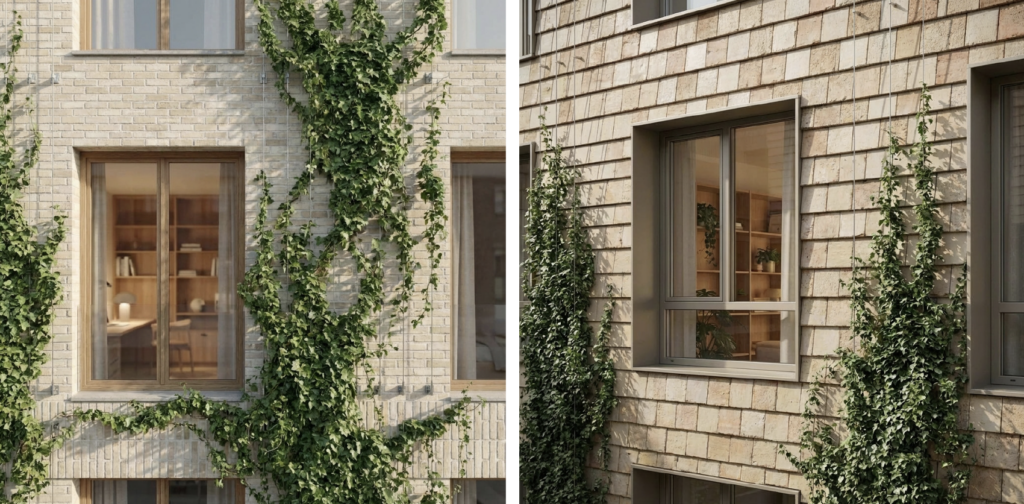
Senior Architect Nis Alexander Stein’s close-ups of a specific green-façade detail using Krea, showing a client exactly how it would sit against the cladding without anything being modeled.
Making Climate Visible
We use Krea to visualize climate scenarios such as flooding and extreme conditions in a way that is far more engaging than the technical maps and graphs traditionally relied on. When the meaning of a design decision cab be instantly clear to every collaborator in the room, we can argue for resilient solutions that might otherwise be deprioritized because no one could really see what was at stake.
The point is not that anyone can type “add a flood” or “show this overgrown” and trust what comes back. Generating the image is the easy part; knowing whether it an accurate representation the hard one.
Every ecological scenario is produced with climate experts who can judge whether what appears on screen matches how those conditions would genuinely unfold — the water levels, the way it spreads, how a site behaves under stress — and whose role is to qualify and verify the result, not simply request it. That is what turns a generated picture into something you can trust: a way to make real risk legible to people who could never read it off a map, a graph or a drawing.
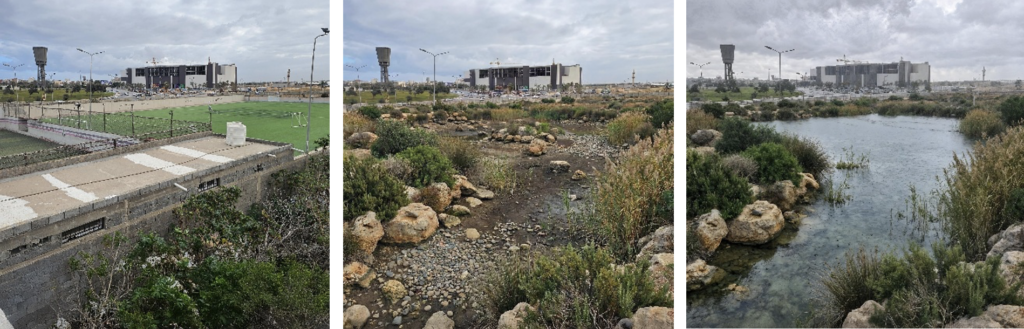
Project Manager and Senior Landscape Architect Philippe Larocque’s Krea visualizations of a proposed water retention bed, and its appearance after a storm event (base image on the left: existing site photo)
A Word on Workflow
Krea is intuitive enough that almost everything described in this article is resolved in basic image or edit mode. Even “prompt engineering,” so often treated as the central skill, is a minor part of it for us. The real work is figuring out what to use Krea for, not how to operate it. Choosing the right task is the workflow.
There are a handful of genuine exceptions, and they cluster wherever consistency is the goal. Madeline Leong’s landscape diagrams depend on a deliberate setup that fixes which visual attributes have to stay constant from one image to the next. The presentation pictograms work the same way — a defined set of rules about what to hold steady so an entire series reads as one family. And in our more finished work we occasionally go hybrid, generating or editing parts of an image in Krea and then compiling them in Photoshop to keep tight control over coherence and quality.
For the overwhelming majority of what we do, the sophistication isn the judgment about when to reach for the tool at all.
That is also why our adoption of Krea has never been treated as a specialist workflow owned by a small group. One of the common traps in enterprise technology adoption is to place a powerful tool in the hands of a few experts and let everyone else delegate to them in the name of efficiency. We wanted the opposite: a horizontal model where architects, interior designers, landscape architects, urban planners, communications colleagues and business developers could all develop a working understanding of the tool.
A New Kind of Craft
The most valuable competence is curatorial agility — knowing when to start and when to stop, when a result is good enough to build on and when to switch back to analog, when to slow down and when to let the AI accelerate. That editorial instinct, knowing what to keep and what to discard, has become as important as any technical ability.
Being intentional with AI isn’t something we can learn overnight, and it isn’t something you can skip. We’re still actively exploring how to balance the genuinely remarkable things this technology offers with the slippery slopes along the way.
Then there are the adjacent skills that have grown up around the tools. People now model in 3D knowing the result will end up in Krea, developing deliberate habits of color-coding, calibrated levels of detail, and composition tuned for AI post-production. As with the hybrid Photoshop approaches mentioned above, the craft lives less in the software than in the foresight someone brings to it.
It is worth naming what this confirms, because it was the sharpest point of debate at our launch. AI does not replace the architect. Architectural quality is subjective, culturally specific and hard to measure; representation carries real responsibility, because a convincing image shapes clients, approvals and expectations. Studying history, visiting places, developing a feel for materials and human behavior — these remain irreducibly human, and they are what good architecture is made of.
Krea has made us faster and broadened who in the studio can communicate visually. It has shifted our culture from presentation toward co-creation and lowered the threshold for the whole technology but the quality of the output still depends entirely on the quality of the thinking behind it.
As we like to say in the office, “AI becomes a megaphone for your ideas” — and a megaphone is only as good as what you have to say into it. The ability to choose well is more critical than ever, and to choose well you need to know a great deal. That is the part no model trains for, and the part we have no intention of handing over.